Changelog Summary - Version 7.4.0
Version 7.4.0 makes Process Studio templates more flexible. Template authors can choose which values a new project is allowed to change, projects ask for those values at creation, comparison now covers injectors and group labels, process health lets you unignore issues, and trackpad navigation finally feels natural. Here is what is new.
🎛 Dynamic overrides in templates
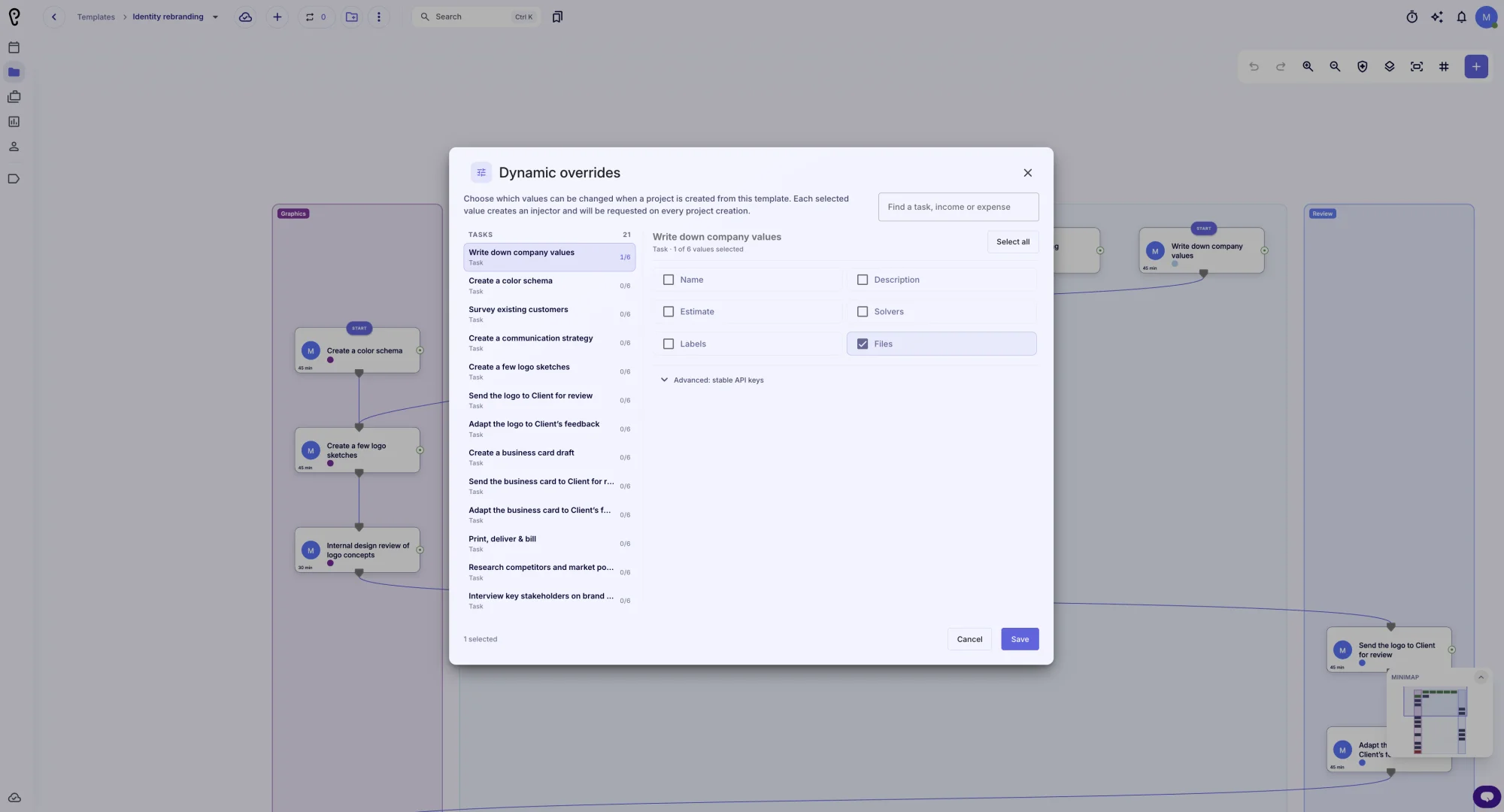
Choose what a project can change: In the template editor, open Dynamic overrides and tick individual task, income or expense values. Every selected value becomes an injector and is requested whenever a project is created from the template.
Tasks and finance: Task name, description, start and end, estimated time, solvers and solver groups, labels and files; income and expense amount and currency.
Find and bulk select: Search tasks, incomes and expenses, select or clear all fields per target, and see how many values are selected.
Stable API keys: An advanced section lets you give each override a stable key for applyTemplate overrides. Keys survive internal GUID changes, and the dialog validates required, invalid and duplicate keys before saving.
Visible on the canvas: Dynamic override injectors are drawn as compact badges attached to the task or finance entry they belong to.
Nested templates: Overrides defined in nested templates are collected too, so child-template values can be changed on the parent project.
💬 Dynamic values at project creation
A new step: When you create a project from a template, a Dynamic values dialog shows the values the template allows you to change.
Only for this project: The values you enter apply to the new project only. The template stays untouched.
Everything in one place: Set names, descriptions, dates, estimates, people and groups, labels, files, amounts and currencies before the project is created.
Safe cancel: Cancel stops project creation; Apply passes the values as overrides.
🔍 Version comparison
New comparison areas: Injectors and Group labels now appear next to tasks, links and other entities, with readable names and field-level changes, so template versions are easier to review.
🩺 Process health
Unignore issues: Suppressed issues keep an Ignored badge and now offer an Unignore action that restores them and records an audit entry.
Cleaner fixes: Suppressed issues no longer appear in fix previews or bulk fix.
Clearer ownership messages: The rule now distinguishes tasks with no predecessor, tasks inside time, backward-time or loop pipelines, and tasks that close automatically when their predecessors close.
🖱 Trackpad and canvas navigation
Trackpad pans: Small non-Ctrl trackpad deltas now pan the canvas instead of zooming, and the gesture mode is fixed from the first event so momentum cannot flip a pan into a zoom.
Pinch and pan: Two-finger pinch keeps zooming and also pans with the moving pinch center, so you can navigate while zooming.
Smooth movement: Pan deltas are collected and applied once per animation frame, which removes the stutter at the end of trackpad momentum.
Mouse wheel unchanged: A physical mouse wheel still zooms, and Cmd + wheel pans.
Stable view: Auto place no longer jumps to fit the screen, and grouping changes skip a full re-layout unless auto-placement is requested, so your zoom and position stay where you left them.
✨ Everyday polish
Grouping dialog: The label grouping dialog has a cleaner title and close action.
Localization: Dynamic overrides dialogs are fully localized and Spanish translations were updated.
We hope these improvements make building and running projects from templates smoother. Thank you for using APUtime!