Changelog Summary - Version 7.0.0
Version 7.0.0 brings a major upgrade to the way you plan, track, and share work. Here is what is new — and what it means for you.
🤖 Meet APU — your AI assistant, everywhere
APU is the new name and home of the AI assistant. It now lives in a convenient side panel that you can open from anywhere in APUtime, so you can get help without leaving the page you are working on.
- Always within reach: Open APU from the header, the navigation, or the floating button, and keep working while it stays open beside you.
- Conversations that remember: Your sessions are saved, receive short automatic titles, and show the model and age at a glance, so you can pick up where you left off.
- Your choice of model: A new model picker and redesigned settings let you switch models and connect your preferred AI provider more easily, including built-in defaults.
- Full control over answers: Stop a long-running response, then select, edit, regenerate, or remove individual messages.
- Work with your files: Attach files, mention people and items with @, and use the workspace explorer to preview, rename, remove, and download files. Images can be read and understood too.
- Keep long chats fast: Use /compact to summarize a long conversation and keep APU focused.
- Talk instead of type: Transcribe your voice directly into the message box with the new microphone button.
- More ways to get answers: APU can search the web, fetch pages, convert documents (PDF, Word, Excel, PowerPoint, CSV, HTML, email, JSON, XML, and ZIP), and run calculations or code in a safe sandbox.
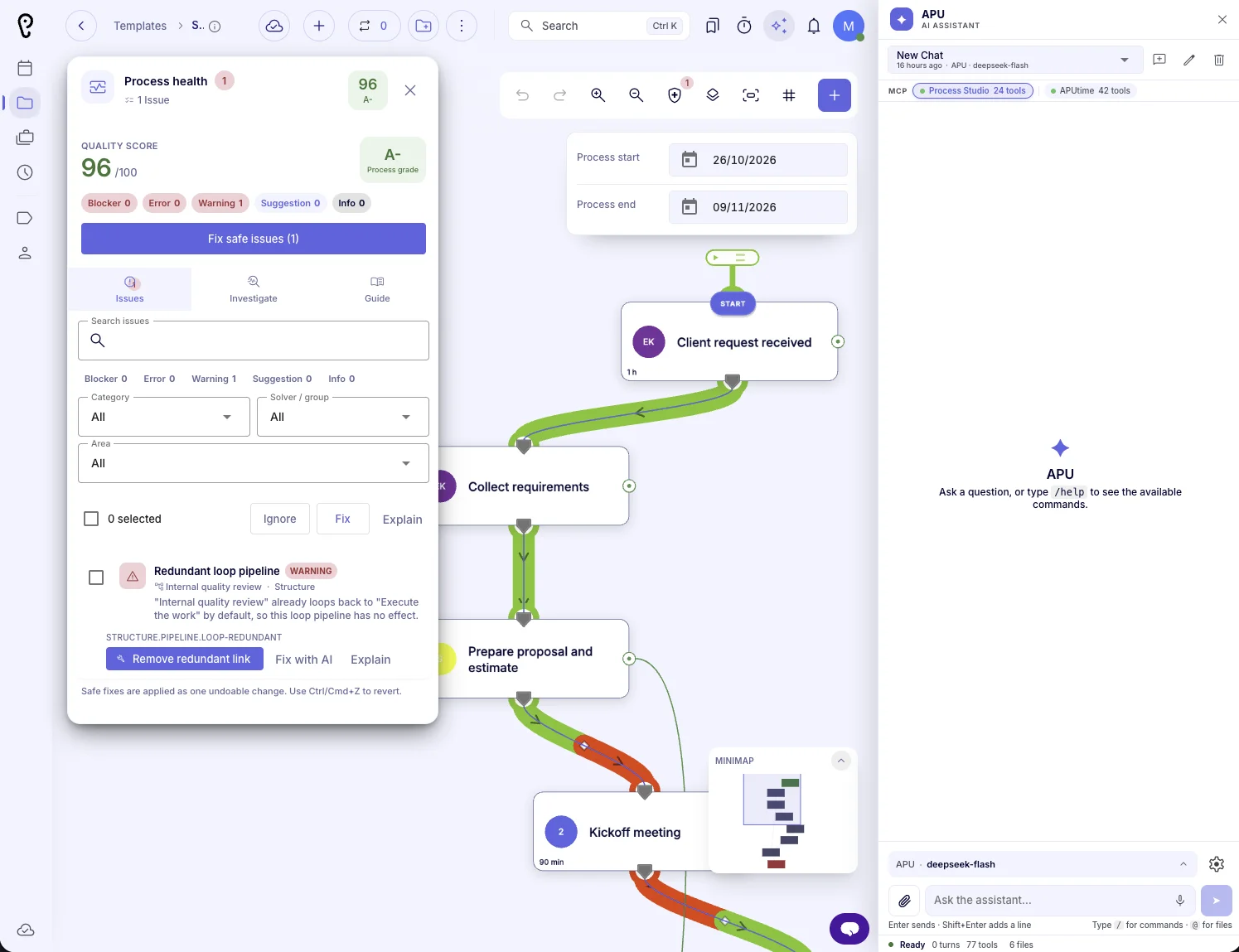
- Built into your work: APU can now help inside Process Studio — inspecting processes, suggesting improvements, and making changes you approve first.
- Polished throughout: A redesigned header, refreshed navigation, better global search, clearer tool activity, and localized settings make the assistant feel like part of APUtime.
🧭 Process Studio (formerly ProjectFormation)
ProjectFormation is now Process Studio. The biggest upgrade is a completely new way of displaying the map: processes with hundreds — or even thousands — of nodes now stay smooth and responsive, so large maps are finally comfortable to explore and edit.
- Built for very large processes: Panning, zooming, selecting, and editing stay fluid even on maps with thousands of nodes, so you can work on complex processes without waiting or losing your place.
- Smoother navigation: Zoom, pan, and use trackpad gestures with instant response, so you can explore even the largest processes without losing your place.
- Details appear when you need them: The view stays clean when you zoom out and reveals labels and secondary information as you zoom in, making maps easier to read at every level.
- Easier connections: Connection points highlight as you hover and links snap to valid spots, so you can build accurate flows with fewer mistakes.
- Workload at a glance: People cards now show workload badges and color-coded tints, while connections animate the flow of work, so you can spot overloaded teammates and bottlenecks immediately.
- Helpful decision support: Decision tools pulse when their input is ready, and the Decisions guide now includes practical guidance and answers to common questions, so branching logic is easier to get right.
- Clearer finance and webhook steps: These steps now appear as neat side cards, making the process easier to follow from start to finish.
- Sharper printouts: Print/PDF now produces a properly fitted, high-quality map, so you can share processes with stakeholders with confidence.
- Cleaner processes: Before saving, Process Studio warns you about redundant connections and requires a real structure before saving a template, so your processes stay readable and reliable.
- Remembered currency: The currency you choose in budget, income, and expense dialogs is remembered, saving you repetitive selections.
- Process Health: A new investigation tab highlights hotspots, orphans, redundant links, missing decisions, flow statistics, and coverage of descriptions, estimates, and ownership — with a clear grade at the top.
- Better issue finding: Filter health issues by severity, category, or node, and let APU list issues and flag redundant loop pipelines for you.
- Accurate start and end detection: Loop and backward pipelines no longer confuse the start and end of a process.
- Clearer version comparison: Removed nodes and connections now appear as dashed ghost overlays, so you can see exactly what changed between versions.
- Safer editing: Field validation now covers all process actions, you are warned before leaving with unsaved work, and unexpected save errors are rolled back automatically.
- Better drafts: The draft history has been redesigned, statistics dialogs can be locked, and “save as new” replaces the old “save as draft” flow.
- Easier template management: The template interval dialog has been redesigned, the showcase toolbar adapts to smaller screens, and template filters now stay visible while you scroll.
- Smarter APU process generation: APU can work with tasks, decisions, time and loop pipelines, sub-processes, income, expenses, webhooks, and updates; set assignees, labels, and checklists; validate people and groups; and apply sensitive changes only after your approval.
- Visual polish: Sharper dashed connections, correctly oriented backward links, smoother panning, a cleaner loader, an anchored showcase panel, and a restyled project decision button.
- Focused editor: Unfinished simulation and scenario-comparison tools were removed to keep Process Studio clear and reliable.
- More languages: Process Studio and APU now include Japanese and additional translations across the app.
⏱️ Smarter Time Tracking
Time entries are now easier to verify and fix, so your timesheets stay accurate.
- Collision analysis: A clear timeline shows which parts of the day are free, occupied, or overlapping, so you can see clashes at a glance.
- Move entries to a free gap: Click a free gap to move the time entry there, turning overlap fixes into a one-click action.
- Warnings before saving: You are warned before saving an entry longer than 8 hours or one that overlaps another entry, so accidental over-logging and duplicate time are avoided.
- Edits keep their duration: Changing the start time moves the end time with it, so entries stay consistent while you adjust them.
- Saving status: A small indicator shows when changes are being saved and when everything is saved, so you always know your work is safe.
👥 People, search, and everyday work
- Redesigned user dialogs: Creating and editing users is clearer, with a new color picker and automatic timezone detection for new users.
- Cleaner workspace: Legacy person-group and label dialogs have been retired in favor of the current flows.
- Faster navigation: Refreshed side navigation, a more useful header, improved global search, and better mobile spacing — including safe-area support.
- Brain Model: A new Brain Model page is ready for the upcoming knowledge workspace. It is currently hidden from navigation while the feature is being built.
✨ Everyday Polish
- No accidental dialog closes: Dialogs no longer close when you click outside them, so unsaved work stays protected until you decide what to do.
- Smoother large lists: Long lists and tables now expand and scroll more smoothly, so reviewing large projects feels faster.
- More reliable on iOS: Process Studio no longer shows a blank board on iPhone and iPad, and the app runs more reliably on mobile, so you can work on the go with confidence.
We hope these improvements make your daily work faster and more enjoyable. Thank you for using APUtime!